Hoshang Mehta
A practical guide to building secure, governed AI agents that can access your data without compromising security or compliance.
Most AI agents need access to structured data—your CRMs, product databases, data warehouses. The naive approach is to give agents direct database credentials and let them query whatever they need. This creates several critical problems:
Security Risks:
- Agents can query any table, any column, any row
- No control over what sensitive data gets exposed
- Risk of accidental data leaks or malicious queries
- Difficult to implement row-level security
Compliance Challenges:
- No audit trail of what data was accessed
- Can't demonstrate data governance to auditors
- Hard to meet regulatory requirements (GDPR, HIPAA, SOC 2)
- No way to prove agents only see approved data
Operational Issues:
- Can't update data schemas without breaking agents
- Difficult to optimize queries (agents write ad-hoc SQL)
- No way to join data across multiple sources
- Performance issues from inefficient queries
The Solution: A Layered Architecture
Instead of direct access, we need a layered architecture where agents interact with data through controlled, governed interfaces. This gives you security, compliance, and operational control while still enabling powerful AI capabilities.
The 5-Layer Architecture

Layer 1: Data Sources
Your raw data repositories—completely off-limits to AI agents.
What Goes Here:
- Production databases (PostgreSQL, MySQL, MongoDB)
- Data warehouses (Snowflake, BigQuery, Redshift)
- SaaS platforms (Salesforce, HubSpot, Stripe)
- APIs and data lakes
Key Principle: Agents never get credentials to these sources. They can't query them directly, ever.
Implementation:
- Store connection credentials securely (encrypted, in secrets management)
- Use read-only credentials where possible
- Implement network-level isolation if needed
- Monitor all connections for anomalies
Layer 2: Data Governance & Security (The Critical Boundary)
This is where you define exactly what data agents can access. Materialized SQL views act as controlled windows into your data.
What Goes Here:
- Materialized views that join data across sources
- Security filters (row-level and column-level)
- Data transformations and aggregations
- Purpose-built views for specific agent use cases
Key Principle: This is the only access point for agents. No exceptions.
Creating Agent Views
Agent views are different from traditional database views. They're purpose-built for AI agent consumption:
1. Cross-Source Joins
Join data from multiple sources into a single view:
CREATE MATERIALIZED VIEW customer_health_comprehensive AS
SELECT
    -- From Salesforce
    s.account_id,
    s.account_name,
    s.account_owner,
    s.contract_value,
    s.renewal_date,

    -- From Product Database
    p.active_users,
    p.feature_adoption_score,
    p.days_since_last_login,
    p.usage_trend,

    -- From Snowflake Analytics
    sf.total_support_tickets,
    sf.avg_ticket_resolution_days,
    sf.revenue_last_quarter,
    sf.churn_risk_score,
    sf.churn_risk_indicators,

    -- Calculated fields
    CASE
        WHEN sf.churn_risk_score > 0.7 THEN 'High Risk'
        WHEN sf.churn_risk_score > 0.4 THEN 'Medium Risk'
        ELSE 'Low Risk'
    END as risk_category,

    -- Timestamp for freshness tracking
    CURRENT_TIMESTAMP as view_refreshed_at

FROM salesforce_accounts s
LEFT JOIN product_usage_metrics p
    ON s.account_id = p.account_id
LEFT JOIN snowflake_customer_analytics sf
    ON s.account_id = sf.account_id
WHERE s.account_status = 'Active'
  AND s.account_type IN ('Enterprise', 'Mid-Market');  -- Row-level filtering
2. Column-Level Security
Exclude sensitive columns from agent access:
CREATE MATERIALIZED VIEW customer_safe_view AS
SELECT
    customer_id,
    customer_name,
    email,
    account_status,
    -- Explicitly exclude: ssn, credit_card, internal_notes
    subscription_tier,
    signup_date
FROM customers
WHERE account_status = 'active';
3. Row-Level Security
Filter rows based on security policies:
CREATE MATERIALIZED VIEW my_territory_customers AS
SELECT
    account_id,
    account_name,
    revenue,
    health_score
FROM all_customers
WHERE account_owner = CURRENT_USER()  -- Only see own accounts
  AND region IN (
      SELECT region
      FROM user_territories
      WHERE user_id = CURRENT_USER()
  );
4. Data Masking
Mask sensitive data while keeping it useful:
CREATE MATERIALIZED VIEW customer_anonymized AS
SELECT
    customer_id,
    -- Mask email: john.doe@company.com -> j***@company.com
    REGEXP_REPLACE(email, '^([^@]{1,3}).*@', '\1***@') as email_masked,
    -- Hash PII for analytics
    MD5(phone_number) as phone_hash,
    account_status,
    subscription_tier
FROM customers;
5. Aggregations and Pre-computation
Pre-compute expensive aggregations:
CREATE MATERIALIZED VIEW customer_metrics_daily AS
SELECT
    customer_id,
    DATE_TRUNC('day', event_timestamp) as date,
    COUNT(*) as event_count,
    COUNT(DISTINCT user_id) as active_users,
    AVG(session_duration) as avg_session_duration,
    SUM(revenue) as daily_revenue
FROM events
GROUP BY customer_id, DATE_TRUNC('day', event_timestamp);
Materialization Strategy
Why Materialize Views:
- Performance: Pre-computed results are fast
- Isolation: Agents query materialized data, not live sources
- Stability: Schema changes in sources don't break agents
- Cost: Reduces load on production databases
Refresh Strategy:
-- Daily refresh for most views
REFRESH MATERIALIZED VIEW customer_health_comprehensive;

-- Or incremental refresh for large datasets
REFRESH MATERIALIZED VIEW CONCURRENTLY customer_metrics_daily;
Best Practices:
- Refresh on a schedule (daily, hourly) based on data freshness needs
- Use incremental refreshes for large datasets
- Monitor refresh times and optimize slow queries
- Version your views (use schema migrations)
Layer 3: MCP Tool Interface
Model Context Protocol (MCP) tools expose your views as callable functions that agents can use. Each tool is a self-documenting function with parameters, validation, and policy checks.
What Goes Here:
- Function definitions with names and descriptions
- Parameter schemas and validation
- SQL queries that reference agent views
- Policy checks (authentication, permissions, row-level security)
Key Principle: Tools are the agent's API. They should be discoverable, well-documented, and secure.
Building MCP Tools
1. Basic Tool Structure
{
  "name": "get_customer_health",
  "description": "Retrieves comprehensive health data for a specific customer account including usage metrics, support tickets, revenue, and churn risk indicators. Use this when users ask about customer status, health scores, or account details.",
  "inputSchema": {
    "type": "object",
    "properties": {
      "account_name": {
        "type": "string",
        "description": "The name of the customer account (e.g., 'Acme Corp')"
      }
    },
    "required": ["account_name"]
  },
  "query": "SELECT * FROM customer_health_comprehensive WHERE account_name = $1",
  "policies": [
    "authenticated",
    "role:customer_success",
    "row_level_security:territory_match"
  ]
}
2. Tool with Multiple Parameters
{
  "name": "identify_at_risk_customers",
  "description": "Identifies customer accounts at high or medium risk of churning, ordered by risk score. Returns account details, risk indicators, and key metrics.",
  "inputSchema": {
    "type": "object",
    "properties": {
      "risk_level": {
        "type": "string",
        "enum": ["High", "Medium", "All"],
        "description": "Filter by risk level. Defaults to 'All' if not specified.",
        "default": "All"
      },
      "limit": {
        "type": "integer",
        "description": "Maximum number of results to return",
        "minimum": 1,
        "maximum": 100,
        "default": 20
      },
      "min_revenue": {
        "type": "number",
        "description": "Minimum contract value to include",
        "minimum": 0
      }
    }
  },
  "query": "SELECT * FROM customer_health_comprehensive WHERE risk_category = CASE WHEN $1 = 'All' THEN risk_category ELSE $1 END AND contract_value >= COALESCE($3, 0) ORDER BY churn_risk_score DESC LIMIT $2",
  "policies": [
    "authenticated",
    "role:customer_success OR role:manager"
  ]
}
3. Tool with Date Range Filtering
{
  "name": "analyze_customer_trends",
  "description": "Analyzes usage trends and support patterns for accounts with declining engagement over a specified time period.",
  "inputSchema": {
    "type": "object",
    "properties": {
      "start_date": {
        "type": "string",
        "format": "date",
        "description": "Start date for analysis (YYYY-MM-DD)"
      },
      "end_date": {
        "type": "string",
        "format": "date",
        "description": "End date for analysis (YYYY-MM-DD)"
      }
    },
    "required": ["start_date", "end_date"]
  },
  "query": "SELECT * FROM customer_health_comprehensive WHERE usage_trend = 'declining' AND view_refreshed_at BETWEEN $1::timestamp AND $2::timestamp",
  "policies": [
    "authenticated",
    "role:manager"
  ]
}
Policy Checks
Policies enforce security at the tool level:
Authentication Policy:
def check_authentication(request):
    token = request.headers.get('X-Pylar-API-Key')
    if not token or not validate_token(token):
        raise UnauthorizedError("Invalid or missing authentication token")
    return get_user_from_token(token)
Role-Based Access Control:
def check_role(user, required_roles):
    user_roles = get_user_roles(user.id)
    if not any(role in user_roles for role in required_roles):
        raise ForbiddenError(f"User must have one of: {required_roles}")
Row-Level Security:
def apply_row_level_security(user, query):
    # Modify query to filter by user's territory
    territory_filter = f"account_owner = '{user.id}' OR region IN ({get_user_regions(user.id)})"
    return f"{query} AND {territory_filter}"
Tool Descriptions Matter
The description field is critical—it's what the LLM uses to decide when to call your tool. Be specific:
Bad:
"description": "Gets customer data"
Good:
"description": "Retrieves comprehensive health data for a specific customer account including usage metrics, support tickets, revenue, and churn risk indicators. Use this when users ask about customer status, health scores, account details, or want to understand why a customer might be at risk."
Best Practices:
- Describe what the tool does and when to use it
- Include example use cases in the description
- Be specific about what data is returned
- Mention any important limitations or filters
Layer 4: AI Agent Layer
Your LLM-powered agent (LangGraph, Cursor, n8n, etc.) that interprets user queries, selects appropriate tools, and synthesizes responses.
What Goes Here:
- Your agent framework (LangGraph, LangChain, etc.)
- LLM configuration (model, temperature, etc.)
- Tool discovery and selection logic
- Response synthesis and formatting
Key Principle: Agents are stateless consumers of MCP tools. They don't know about your data sources—only the tools available to them.
Agent Implementation Example
LangGraph Agent:
from langgraph.graph import StateGraph, END
from langchain_openai import ChatOpenAI
from langchain_core.messages import HumanMessage, AIMessage
import requests

class PylarAgent:
    def __init__(self, pylar_api_key, pylar_endpoint):
        self.api_key = pylar_api_key
        self.endpoint = pylar_endpoint
        self.llm = ChatOpenAI(model="gpt-4", temperature=0)
        self.tools = self._discover_tools()

    def _discover_tools(self):
        """Discover available MCP tools from Pylar"""
        response = requests.get(
            f"{self.endpoint}/tools",
            headers={"X-Pylar-API-Key": self.api_key}
        )
        return response.json()["tools"]

    def _select_tool(self, user_query, tools):
        """Use LLM to select the best tool for the query"""
        tool_descriptions = "\n".join([
            f"- {t['name']}: {t['description']}"
            for t in tools
        ])

        prompt = f"""Given the user query, select the most appropriate tool.

Available tools:
{tool_descriptions}

User query: {user_query}

Return only the tool name."""

        response = self.llm.invoke([HumanMessage(content=prompt)])
        selected_tool = response.content.strip()
        return next(t for t in tools if t["name"] == selected_tool)

    def _call_tool(self, tool, parameters):
        """Call a Pylar MCP tool"""
        response = requests.post(
            f"{self.endpoint}/tools/{tool['name']}/execute",
            headers={"X-Pylar-API-Key": self.api_key},
            json={"parameters": parameters}
        )
        return response.json()

    def process_query(self, user_query, user_context=None):
        """Process a user query end-to-end"""
        # 1. Select appropriate tool
        tool = self._select_tool(user_query, self.tools)

        # 2. Extract parameters from query
        # (Use LLM to extract structured parameters from natural language)
        parameters = self._extract_parameters(user_query, tool)

        # 3. Call tool
        tool_result = self._call_tool(tool, parameters)

        # 4. Synthesize response
        response = self._synthesize_response(user_query, tool_result)

        return response
Tool Selection with Function Calling:
Modern LLMs support function calling, which makes tool selection easier:
def get_tool_schema(tool):
    """Convert MCP tool to OpenAI function schema"""
    return {
        "type": "function",
        "function": {
            "name": tool["name"],
            "description": tool["description"],
            "parameters": tool["inputSchema"]
        }
    }

# Use OpenAI function calling
response = client.chat.completions.create(
    model="gpt-4",
    messages=[{"role": "user", "content": user_query}],
    tools=[get_tool_schema(t) for t in available_tools],
    tool_choice="auto"
)

# LLM will automatically select and call the right tool
Layer 5: User Interface
End users interact with your agent through chat interfaces, APIs, or applications.
What Goes Here:
- Chat UI (web, Slack, Teams)
- API endpoints
- Mobile apps
- Voice interfaces
Key Principle: Users don't need to know about the architecture. They just ask questions and get answers.
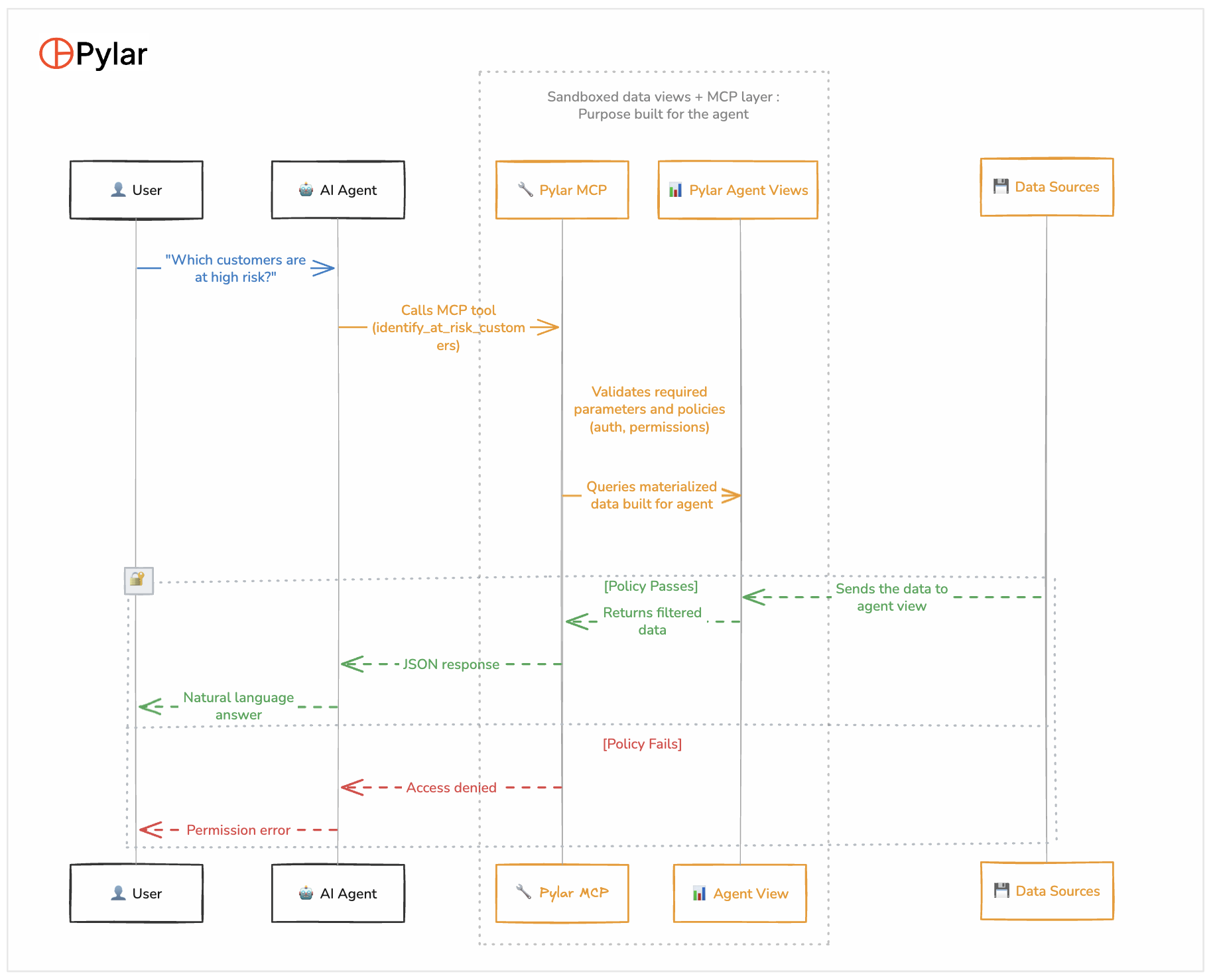
Complete Flow: From Query to Response
Here's what happens when a user asks a question:
Step-by-Step:
-
User Query: "Which customers are at high risk of churning?"
-
Agent Processing:
- LLM interprets the query
- Reviews available MCP tools
- Selects
identify_at_risk_customersbased on tool description
-
Tool Invocation:
- Agent calls Pylar MCP endpoint
- Includes authentication header
- Passes parameters:
{risk_level: "High"}
-
Policy Validation:
- Pylar validates authentication token
- Checks user role (must be customer_success or manager)
- Validates parameter format
- Applies row-level security if needed
-
Query Execution:
- If policies pass, executes SQL against agent view
- View is sandboxed—agent never touches raw databases
- Query runs against materialized data
-
Data Retrieval:
- Materialized view returns pre-computed results
- Data is already filtered (columns, rows, security rules applied)
-
Response Formatting:
- MCP layer formats results as JSON
- Logs query for audit trail
-
Response Synthesis:
- Agent receives structured data
- LLM synthesizes natural language response
- Adds insights and recommendations
-
User Receives Answer:
- "I found 12 customers at high risk. The top 3 are: Acme Corp (risk score: 0.85), TechStart (0.78), Global Solutions (0.72). Would you like detailed analysis for any of these?"
Implementation Guide
Step 1: Connect Your Data Sources
Using Pylar (or similar platform):
-
Navigate to Integrations section
-
Add data source connections:
- Salesforce: OAuth connection
- PostgreSQL: Connection string (use read-only user)
- Snowflake: Credentials (encrypted storage)
-
Test connections
-
Verify read access
Security Checklist:
- Use read-only credentials where possible
- Store credentials encrypted
- Use network isolation if needed
- Monitor connection logs
Step 2: Create Agent Views
In Pylar SQL IDE (or your database):
- Write SQL query joining your data sources
- Add security filters (row-level, column-level)
- Test the query
- Save as materialized view
- Set refresh schedule
Example View Creation:
-- Test query first
SELECT
    s.account_name,
    p.active_users,
    sf.churn_risk_score
FROM salesforce_accounts s
LEFT JOIN product_usage p ON s.account_id = p.account_id
LEFT JOIN snowflake_analytics sf ON s.account_id = sf.account_id
WHERE s.account_status = 'Active'
LIMIT 10;

-- If results look good, create materialized view
CREATE MATERIALIZED VIEW customer_health_comprehensive AS
-- ... (full query from above)
View Best Practices:
- Start with a simple view, iterate
- Test with sample queries before materializing
- Document what data is included and why
- Version your views (use migrations)
- Monitor refresh performance
Step 3: Build MCP Tools
In Pylar (or your MCP server):
- Create new MCP tool
- Define function name and description
- Specify input schema (parameters)
- Write SQL query referencing your view
- Configure policy checks
- Test the tool
Tool Definition Example:
{
  "name": "get_customer_health",
  "description": "Retrieves comprehensive health data for a customer account. Use when users ask about customer status, health scores, or account details.",
  "inputSchema": {
    "type": "object",
    "properties": {
      "account_name": {
        "type": "string",
        "description": "Customer account name"
      }
    },
    "required": ["account_name"]
  },
  "query": "SELECT * FROM customer_health_comprehensive WHERE account_name = $1",
  "policies": ["authenticated", "role:customer_success"]
}
Tool Testing:
- Test with valid parameters
- Test with invalid parameters (should fail gracefully)
- Test policy checks (unauthorized user should be denied)
- Verify response format
Step 4: Test in Agent Playground
Before publishing, test your tools:
-
Open agent playground
-
Try sample queries:
- "What's the health status of Acme Corp?"
- "Show me all high-risk customers"
- "Which accounts have declining usage?"
-
Observe:
- Does agent select the right tool?
- Are parameters extracted correctly?
- Is the response useful?
-
Review observability dashboard:
- Which tools were called?
- Query execution times?
- Policy check results?
Iterate:
- Refine tool descriptions if agent selects wrong tool
- Adjust parameters if extraction fails
- Optimize queries if they're slow
Step 5: Publish to Agent Builder
Generate credentials:
- API key:
pylar_sk_xxxxx - Endpoint URL:
https://api.pylar.ai/mcp
Connect to your agent builder:
LangGraph:
from langchain_pylar import PylarMCP

pylar = PylarMCP(
    api_key="pylar_sk_xxxxx",
    endpoint="https://api.pylar.ai/mcp"
)

# Tools are automatically discovered
agent = create_agent(llm, tools=pylar.get_tools())
Cursor/Claude Desktop: Add to MCP configuration:
{
  "mcpServers": {
    "pylar": {
      "url": "https://api.pylar.ai/mcp",
      "headers": {
        "X-Pylar-API-Key": "pylar_sk_xxxxx"
      }
    }
  }
}
n8n:
- Add HTTP Request node
- Configure MCP endpoint
- Use function calling workflow
Step 6: Monitor and Iterate
Set up monitoring:
- Query logs: Who accessed what data?
- Performance metrics: Query execution times
- Error tracking: Failed queries, policy violations
- Usage analytics: Which tools are used most?
Iterate based on feedback:
- Update views if users need different data
- Add new tools for new use cases
- Refine tool descriptions based on agent behavior
- Optimize slow queries
Security Best Practices
1. Principle of Least Privilege
Agents should only access the minimum data needed:
-- Bad: Exposes everything
SELECT * FROM customers;

-- Good: Only necessary columns
SELECT
    customer_id,
    customer_name,
    account_status,
    health_score
FROM customers
WHERE account_status = 'active';
2. Row-Level Security
Filter data based on user context:
CREATE MATERIALIZED VIEW my_customers AS
SELECT * FROM all_customers
WHERE account_owner = CURRENT_USER()
  OR region IN (SELECT region FROM user_territories WHERE user_id = CURRENT_USER());
3. Column-Level Security
Exclude sensitive columns:
-- Explicitly list safe columns
SELECT
    customer_id,
    customer_name,
    -- DO NOT include: ssn, credit_card, internal_notes
    subscription_tier
FROM customers;
4. Data Masking
Mask sensitive data:
SELECT
    customer_id,
    -- Mask email
    REGEXP_REPLACE(email, '^([^@]{1,3}).*@', '\1***@') as email,
    -- Hash phone
    MD5(phone_number) as phone_hash
FROM customers;
5. Audit Everything
Log all queries:
- Who asked what
- Which tool was called
- What data was accessed
- When it happened
- Policy check results
6. Regular Reviews
- Review access logs regularly
- Audit which views are being used
- Remove unused tools/views
- Update security policies as needed
Performance Optimization
1. Materialize Expensive Queries
Pre-compute joins and aggregations:
-- Expensive query - materialize it
CREATE MATERIALIZED VIEW customer_metrics_daily AS
SELECT
    customer_id,
    date,
    COUNT(*) as events,
    SUM(revenue) as revenue
FROM events
GROUP BY customer_id, date;
2. Index Your Views
Add indexes on commonly filtered columns:
CREATE INDEX idx_customer_health_account_name
ON customer_health_comprehensive(account_name);

CREATE INDEX idx_customer_health_risk_score
ON customer_health_comprehensive(churn_risk_score);
3. Incremental Refreshes
For large datasets, refresh incrementally:
REFRESH MATERIALIZED VIEW CONCURRENTLY customer_metrics_daily;
4. Query Optimization
- Use EXPLAIN to analyze query plans
- Add WHERE clauses to filter early
- Use appropriate JOIN types
- Limit result sets when possible
Common Patterns
Pattern 1: Customer Health Dashboard
View:
CREATE MATERIALIZED VIEW customer_health AS
SELECT
    account_id,
    account_name,
    health_score,
    risk_factors,
    last_activity_date
FROM customer_analytics;
Tools:
get_customer_health(account_name)- Get single customerlist_at_risk_customers(risk_level, limit)- List by riskanalyze_health_trends(start_date, end_date)- Trend analysis
Pattern 2: Sales Pipeline Analysis
View:
CREATE MATERIALIZED VIEW sales_pipeline AS
SELECT
    opportunity_id,
    account_name,
    stage,
    amount,
    probability,
    close_date
FROM salesforce_opportunities
WHERE is_closed = false;
Tools:
get_pipeline_summary()- Overall pipeline healthget_opportunities_by_stage(stage)- Filter by stageforecast_revenue(quarter)- Revenue forecasting
Pattern 3: Product Usage Analytics
View:
CREATE MATERIALIZED VIEW product_usage_daily AS
SELECT
    customer_id,
    date,
    active_users,
    feature_usage,
    session_count
FROM product_events
GROUP BY customer_id, date;
Tools:
get_usage_metrics(customer_id, start_date, end_date)- Customer usageidentify_low_usage_customers(threshold)- Find at-risk accountsanalyze_feature_adoption(feature_name)- Feature analytics
Troubleshooting
Agent Selects Wrong Tool
Problem: Agent calls the wrong MCP tool for a query.
Solutions:
- Improve tool descriptions (be more specific about when to use)
- Add example use cases to descriptions
- Use more distinct tool names
- Provide better context in user queries
Slow Query Performance
Problem: Queries take too long to execute.
Solutions:
- Materialize the view if not already
- Add indexes on filtered columns
- Optimize the SQL query (use EXPLAIN)
- Consider incremental refreshes
- Limit result sets
Policy Check Failures
Problem: Valid users are being denied access.
Solutions:
- Review policy definitions
- Check user roles/permissions
- Verify authentication tokens
- Review row-level security rules
Data Freshness Issues
Problem: Agents see stale data.
Solutions:
- Increase materialized view refresh frequency
- Use incremental refreshes for large datasets
- Add
last_updatedtimestamp to views - Consider real-time views for critical data
Conclusion
This 5-layer architecture provides a secure, governed way to connect AI agents to your data stack:
- Data Sources - Your raw data (off-limits to agents)
- Agent Views - Materialized, sandboxed views (the security boundary)
- MCP Tools - Self-documenting functions with policy checks
- AI Agents - LLM-powered agents that use tools
- User Interface - Where users interact
Key Takeaways:
- Agents never access raw databases—only through views
- Views are materialized for performance and isolation
- MCP tools provide a clean API with built-in security
- Every query is logged for compliance
- Architecture is flexible—update views without changing agents
Next Steps:
- Start with one data source and one view
- Build a simple MCP tool
- Test in an agent playground
- Iterate based on feedback
- Scale to more sources and use cases
This architecture gives you the security and governance you need while enabling powerful AI capabilities. Start small, iterate, and scale.
This architecture pattern is implemented in Pylar, but the concepts apply to any system connecting AI agents to structured data. The key is the layered approach with views as the security boundary.